I Got Tired of Hunting for SVG Logos. So I Open-Sourced 4,000 of Them
theSVG hit 4,007 icons with dedicated dark/light variants, React components, an MCP server, and a free API. Here's what changed since launch.
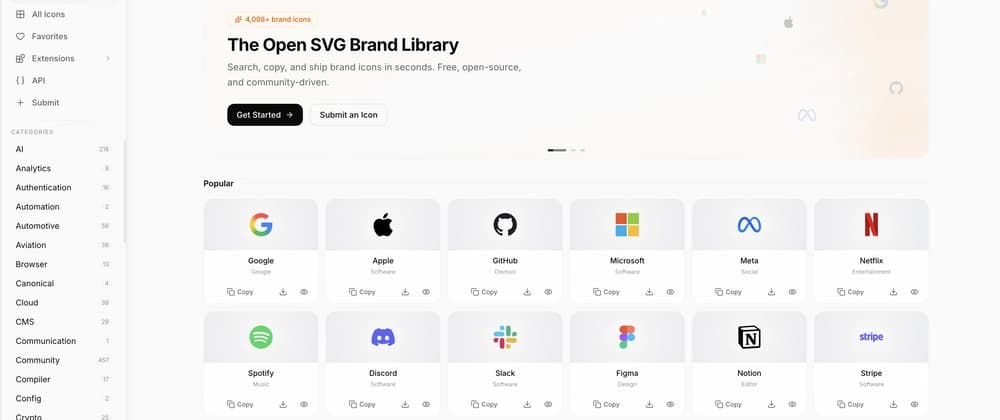
title: "I Got Tired of Hunting for SVG Logos. So I Open-Sourced 4,000 of Them" published: true description: "theSVG hit 4,007 icons with dedicated dark/light variants, React components, an MCP server, and a free API. Here's what changed since launch." tags: opensource, webdev, javascript, react canonical_url: https://thesvg.org series: "theSVG Icons"#
A few days ago, we launched theSVG on DEV with ~3,847 brand SVG icons.
Since then:
- 4,007 icons (160+ new brands added)
- 56 categories (up from 20+)
- Dedicated dark and light variants for hundreds of icons
- Enhanced search with category, page, and extension results
- MCP server so Claude, Cursor, and Windsurf can fetch icons natively
Here's what's new and what we learned building it.
The icon count problem nobody warns you about#
When we launched, people asked: "Why not just use Simple Icons?"
Fair question. Simple Icons is a great project. But here's what happens in practice:
You need the Stripe logo on a dark background. Simple Icons gives you a monochrome SVG. You need the colored version. You go to Stripe's press page. They give you a PNG. You convert it. The viewBox is wrong. You fix it. You repeat this for 15 more brands.
theSVG gives you up to 5 variants per icon:
default- brand colors, the standard logomono- single color, works with any themelight- optimized for light backgroundsdark- optimized for dark backgroundswordmark- full text logo with the brand name
No conversion. No hunting. Just pick the variant you need.
What's new since launch#
Dedicated dark and light variants#
Most icon libraries give you one file and wish you luck on dark backgrounds. We ship separate dark and light variants for hundreds of icons, so you always get a version that's designed to look right on your background - not a hacky CSS inversion.
https://thesvg.org/icons/github/default.svg   <- brand colors
https://thesvg.org/icons/github/dark.svg       <- built for dark bg
https://thesvg.org/icons/github/light.svg      <- built for light bg
The website automatically shows the right variant based on your theme. In code, just pick the variant you need.
Search got smarter#
The search bar (Cmd+K) now returns grouped results:
- Icons - with variant badges showing what's available (mono, dark, wordmark...)
- Categories - type "design" and the Design category appears with its icon count
- Pages - Extensions, API Docs, Submit are all searchable
- Extensions - find the React package, Figma plugin, CLI, or MCP server
- Recent searches - your last 5 searches persist across sessions
MCP server for AI coding#
This is the one people didn't expect to care about, then couldn't stop using.
{
  "mcpServers": {
    "thesvg": {
      "command": "npx",
      "args": ["@thesvg/mcp-server"]
    }
  }
}
Tell Claude "add the GitHub logo to my navbar" and it pulls the actual SVG from theSVG. No copy-pasting URLs. No leaving your editor.
Works with Claude Code, Cursor, Windsurf, and any MCP-compatible tool.
The developer toolkit (quick refresher)#
If you missed the first post, here's the full stack:
npm packages#
# Core library - all 4,007 icons, tree-shakeable
npm install thesvg

# React components with forwardRef + TypeScript
npm install @thesvg/react

# CLI - shadcn-style icon installer
npx @thesvg/cli add github stripe figma
React usage#
import { Github, Figma, Stripe } from "@thesvg/react";

function Footer() {
  return (
    <div className="flex gap-4">
      <Github className="h-5 w-5" />
      <Figma className="h-5 w-5" />
      <Stripe className="h-5 w-5" />
    </div>
  );
}
Every component is individually importable. Your bundler only ships what you use. One icon is ~3KB, not 12MB.
CDN - zero install#
<img src="https://thesvg.org/icons/github/default.svg" width="32" />
<img src="https://thesvg.org/icons/github/dark.svg" width="32" />
Use these in READMEs, docs, emails, dashboards, Notion pages. No API key, no account.
REST API#
# Search
curl https://thesvg.org/api/icons?q=stripe&category=Finance

# Get one icon with all metadata
curl https://thesvg.org/api/icons/stripe

# List categories
curl https://thesvg.org/api/categories
Open, free, no auth required. Build custom icon pickers, internal tools, or CI pipelines that validate brand assets.
What we learned#
1. Variants matter more than quantity#
We could have shipped 10,000 monochrome icons. Instead we focused on quality variants. A single icon with default, dark, mono, and wordmark covers 95% of real use cases. Developers don't need 10 versions of a logo. They need the right 4.
2. Dark mode needs dedicated variants, not hacks#
CSS filter: invert() seems like a quick fix for dark backgrounds, but it breaks brand colors. A blue logo becomes orange. A red badge turns cyan. The only reliable solution is shipping actual dark-optimized SVGs. We now have dedicated dark and light variants for the most popular brands, and we're growing that coverage with every release.
3. AI integration drives adoption#
The MCP server was an experiment. It turned out to be one of the most-used features. Developers who use AI coding tools want their tools to have access to real assets, not hallucinated URLs. If you maintain an open-source library, consider building an MCP server. It's a distribution channel most people haven't discovered yet.
4. CDN links are the silent hero#
The npm packages get the attention, but the CDN links drive the most traffic. People drop thesvg.org/icons/react/default.svg into GitHub READMEs, Notion docs, and Slack messages. Every usage is a backlink. Build your assets to be directly linkable.
The full package list#
thesvg- all icons, one import@thesvg/icons- core data + TypeScript types@thesvg/react- 4,007 typed React components@thesvg/cli- CLI: search, add, export@thesvg/mcp-server- MCP server for AI assistants
Try it#
Browse: thesvg.org
Install: npm install @thesvg/react
Star: github.com/GLINCKER/thesvg
MIT licensed. Brand icons remain the property of their respective trademark holders.
Missing a brand? Submit it or open a PR.
If theSVG saved you time, a star on GitHub helps more than you'd think.
This is a follow-up to our launch post. theSVG is maintained by GLINCKER.